


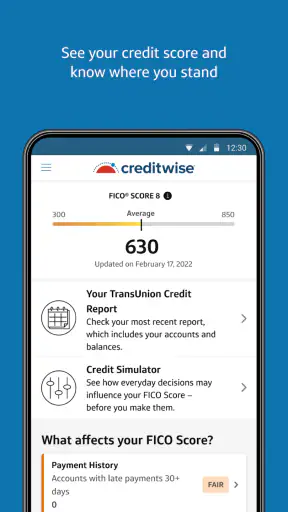
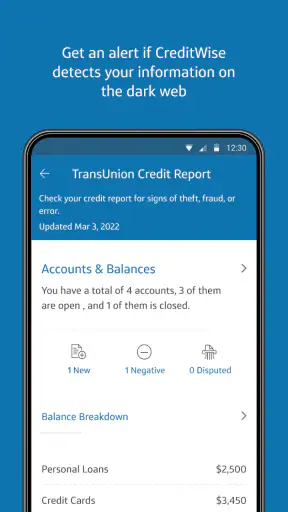
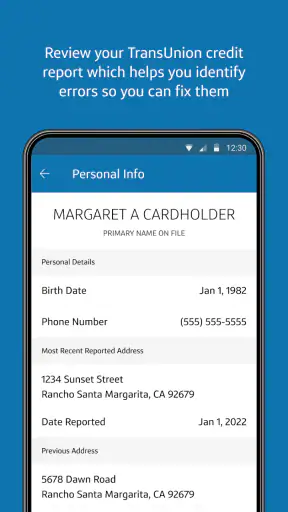
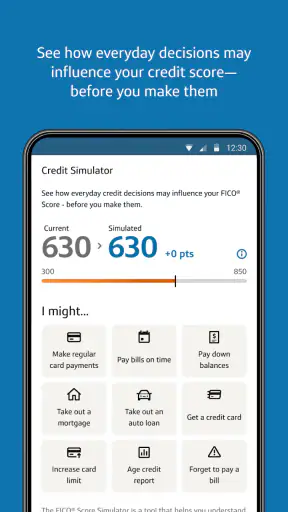
Checking a credit score on a phone sounds simple, but the useful part is not the number alone. What matters is being able to open the app when a financial decision is in front of you, understand what the score means, and notice changes before they become a surprise. I spent time with CreditWise from Capital One as a finance app, and my impression is that it is most valuable as a quick credit-awareness tool rather than a complete replacement for every banking or credit-monitoring service.
The app is free, aimed at everyone, and developed by Capital One Services, LLC. That makes it easy to approach if you want a low-commitment way to keep an eye on your credit. Its average rating is 4.6 from around 116 thousand ratings, and it has passed 5 million installs, so it is clearly familiar to a large mobile audience. Still, popularity does not remove the need to understand where it fits in your routine, especially because the experience depends heavily on having a working connection at the moments when you need it.
How CreditWise feels when your connection is doing the work
The central experience is built around retrieving current credit information and presenting it in a form that is easier to digest than a dense financial document. When the network is available, the process feels naturally suited to a phone: open the app, check the main information, look for a change, and close it again. I like that rhythm because credit monitoring is more useful when it becomes a small habit rather than an occasional research project.
Connectivity is not just a background convenience here. It shapes whether the app can show you the information you opened it to see. On a reliable home or mobile connection, the short sessions make sense. On a weak signal, the experience can become less predictable: loading takes longer, information may not appear immediately, and repeated attempts can turn a two-minute check into an irritating interruption. I would not treat the app as a tool for a place where you know your phone will regularly be disconnected.
A realistic example is applying for an apartment while standing outside a property office. You may want to check your credit position before discussing the application, particularly if you have recently paid down a balance or noticed an unfamiliar account. CreditWise is convenient in that moment because the phone is already with you. However, I would check it before the appointment as well, rather than waiting until the last second. A crowded building, poor reception, or overloaded public Wi-Fi can make a network-dependent financial check less comfortable than expected.
The practical strength is quick awareness, not instant financial certainty. A score can help you decide whether to investigate further, but it should not become the only factor in a lending, rental, or budgeting decision. I found the app easier to use when I treated its information as a prompt for the next sensible action: review a recent change, verify an account, or postpone a major application until I had a fuller picture.
Why short sessions work better than constant checking
Credit monitoring can encourage unproductive refreshing. I prefer using this app at deliberate moments: after paying down a large balance, before comparing borrowing options, or when a notification or account statement raises a question. That approach reduces the temptation to interpret every small movement as an emergency.
This is also where a phone app has an advantage over visiting a desktop website. I can make a quick check during a lunch break or while organizing documents for a move. The trade-off is that a smaller screen encourages skimming. If you are trying to understand a complicated credit situation, a larger browser window or a direct conversation with the relevant financial institution may be better for careful comparison.
Using it in everyday mobile situations
CreditWise fits people who manage most everyday tasks from a phone. If you already use mobile banking, digital statements, and calendar reminders, adding a credit check to that routine feels natural. I can imagine opening it before making a large purchase, after changing a recurring payment, or while preparing a list of questions for a lender.
The best mobile workflow is to check your context first. If you are on public transport with an unstable signal, wait until you have a dependable connection. If you are using mobile data, avoid repeatedly reopening the same screen simply because it did not load quickly. A single patient attempt is usually more sensible than tapping through multiple retries. This is not a dramatic limitation, but it matters when the information is time-sensitive and your phone is already busy handling other tasks.
Another useful habit is to separate observation from action. I might use the app to notice that something deserves attention, then switch to a statement, a card issuer’s service, or another official channel to resolve it. That division keeps the app in its strongest role. It is a monitoring window, not necessarily the place where every financial problem can be fixed.
For someone who shares devices, uses an older phone, or is careful about opening financial apps in public, the mobile format also deserves a little thought. I would avoid checking sensitive information while someone is looking over my shoulder, and I would not rely on a public network for a rushed session if I could wait. These are ordinary privacy habits, but they are especially relevant when an app puts personal credit information within easy reach.
Who benefits most from the phone-first approach
I think the app is particularly suitable for people building credit awareness for the first time, users who want a simple recurring check, and anyone who prefers a lightweight finance tool instead of a large bundle of budgeting features. It can also help someone preparing for a move or a major purchase identify whether a follow-up conversation is necessary before submitting an application.
It is less suitable for a person who expects a complete financial dashboard with detailed spending analysis, bill management, investment tracking, and extensive account aggregation. In that case, a broader personal-finance service may be a better primary tool, with CreditWise used only as a focused credit check. I would also hesitate to make it the sole resource for someone dealing with identity concerns or a disputed account; those situations require direct investigation through the appropriate institutions.
What happens when the app or network lets you down
Any connected finance app has a failure point between your phone and the information it is trying to retrieve. The frustrating part is that a blank, delayed, or interrupted view can leave you unsure whether the issue is your connection, a temporary service problem, or something that needs attention in your account. I found it important not to treat a loading problem as evidence that my credit situation had suddenly changed.
My recovery routine would be simple. First, I would stop repeated taps and check whether other internet-dependent apps are working. Then I would move from a weak mobile signal to a more reliable connection, close and reopen the app if necessary, and try again later rather than making a financial decision based on an incomplete screen. If the issue continued, I would use the relevant official support route instead of assuming that the app itself could explain the cause.
This matters because financial apps create a strong urge to act immediately. A failed refresh before a loan conversation can make a user feel unprepared, but the sensible response is to delay the decision when possible. Keep recent statements or other records available if you know you are heading into an important appointment. That backup does not replace the app; it simply prevents a connectivity problem from controlling your schedule.
I also recommend avoiding interpretation based on a single interrupted session. If the app eventually displays information after a delay, read it carefully and compare it with the context you already know. If something looks unfamiliar, document what you see and investigate through the proper channel. The app can help you notice a question, but a network hiccup should never be mistaken for proof of fraud, an error, or a scoring change.
Why recovery matters more than speed
The appeal of a mobile credit tool is immediacy, yet responsible credit management often rewards patience. If you are about to submit an application, a delayed check is a reason to pause, not to guess. If you are simply maintaining awareness, there is little benefit in forcing a session during poor reception.
This is one of the clearest trade-offs compared with a paper statement or a downloaded record. A physical or locally saved reference is available without waiting for a live connection, while a connected app can present a more convenient current check when everything works. I would use CreditWise for the latter and keep separate records for moments when connectivity is uncertain.
Using the app thoughtfully with mobile data
CreditWise is free, which removes a major barrier to trying it, but “free” does not mean every use is costless in practice. Your mobile connection still has its own limits, and repeated loading while traveling can consume data or battery. I would make routine checks on a trusted Wi-Fi connection when convenient, while reserving mobile data for situations where the information is genuinely useful right then.
Being data-conscious also means limiting unnecessary refreshes. Open the app with a clear reason, read the information, note what needs follow-up, and leave. That is better for your connection and makes the habit more meaningful. If you are comparing several financial possibilities, write down the relevant points rather than reopening the same screens over and over.
Public Wi-Fi deserves caution as well. I would not use an unknown network simply because it is faster than a weak signal, especially for personal financial information. Waiting for a trusted connection is often the better trade-off. When waiting is impossible, I would keep the session brief and avoid entering more information than necessary.
The app’s current version is 1.151.0, and it supports an operating system starting with version 11. That is useful to know before planning a setup on an older device. If your phone cannot meet that requirement, the problem is not something a stronger network will solve; you would need a compatible device or another way to manage your credit information. I appreciate checking compatibility before relying on any finance app for an important appointment.
How it compares with familiar alternatives
The usual alternatives fall into three groups: a bank or card issuer’s own app, a desktop credit website, and a broader finance app. A bank app may be more convenient for checking balances and payments because it already handles those tasks, but it may not offer the same focused credit-monitoring experience. A desktop service can be easier for detailed research, while CreditWise is better suited to a fast phone check. A budgeting app may show spending patterns that this focused tool does not aim to replace.
My preferred combination would depend on the job. I would use my banking app for transactions, a budgeting service for household planning, and CreditWise for a concise credit-awareness routine. If I wanted only one app for all financial activity, I would look elsewhere. If I wanted a free, focused way to make credit checking less intimidating, this app would be much more appealing.
The important distinction is not that one option is universally superior. It is that CreditWise reduces the distance between remembering to check and actually checking, provided the connection is dependable. That convenience can be more valuable than a long list of extra financial tools for someone who otherwise avoids credit monitoring altogether.
My connectivity verdict after using it as a routine tool
CreditWise from Capital One works best when I treat it as a connected snapshot inside a larger financial routine. Its free price, Everyone age rating, and focused finance category make it approachable, while its mobile design suits quick checks during ordinary life. The large user base and strong average rating suggest that many people find this straightforward approach useful, but I would still judge it by my own needs rather than popularity alone.
I would recommend it to a reader who wants a simple way to stay aware of credit information, has a compatible phone, and can usually connect through reliable Wi-Fi or mobile service. I would especially recommend setting a specific purpose for each visit: checking after a meaningful financial change, preparing for an application, or investigating something that looks unfamiliar.
I would skip it as a primary solution if you need detailed budgeting, full financial planning, or a tool that remains equally useful without a live connection. I would also avoid making any credit decision while the app is still loading or after a failed session. Its real value is helping you notice when a closer look is needed, not replacing every other source of financial information.
Released on April 12, 2016, and still maintained in its current version, the app has had time to establish a clear identity: a focused mobile companion for credit awareness. In my experience, that focus is its best quality. It keeps the task manageable, but it also means I need to understand its boundaries. Used with a reliable connection, sensible privacy habits, and a backup plan for important moments, it is an easy app to recommend to a friend who wants to make credit monitoring part of everyday life.
For me, the final decision comes down to expectations. If you want a quick, free check on your phone and understand that connectivity affects when the information is available, CreditWise from Capital One is a practical choice. If you want a complete financial command center or guaranteed access in disconnected situations, choose a broader or more traditional alternative instead. That honest distinction makes the app more useful, because it lets you rely on it for what it does well without asking it to become something else.


